
Downloading Affirm repayment JSON
Downloading JSON data can seen daunting at first, but following our quick video guide you’ll be able to download your Affirm repayment JSON in just a few clicks!
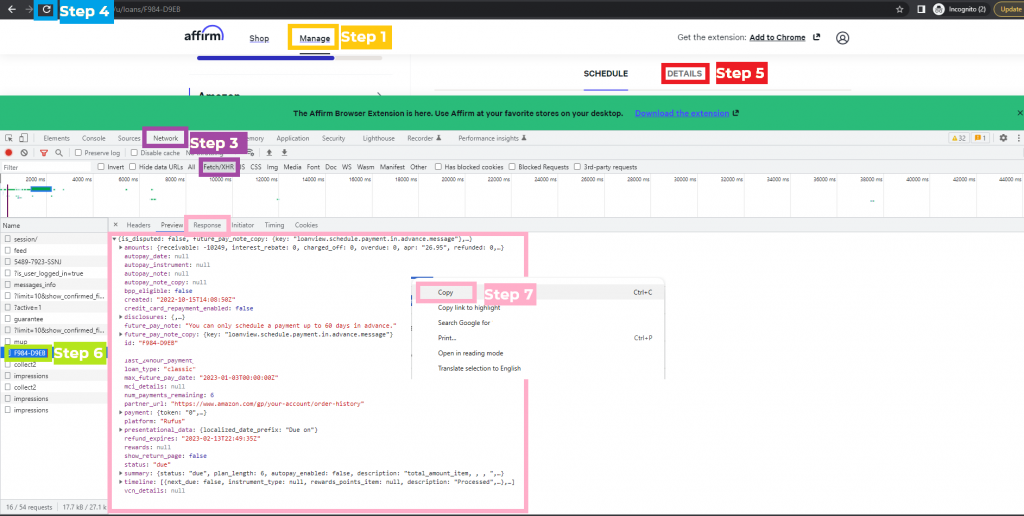
- Log in to your Affirm account on a desktop and go to the Manage tab.
- Open Developer Tools: Right-click anywhere on the page and select Inspect.
- In the panel that opens, click the Network tab, then select Fetch/XHR.
- Refresh the page (make sure you’re still on the Manage tab).
- Select your loan/ repayment plan and click Details.
- In the Developer Tools, find a file with a name like XXXX-XXXX (e.g., F984-D9EB) and click on it (if there are two of the same name, click on the one further down the page).
- In the Response section, select and copy all text.
- Paste the copied data into a Word or TXT file.
- Repeat these steps for each loan/repayment plan from the accepted date range.
- Submit your files by emailing them to pr******@*******es.com.
This is a guide to help members of our ongoing paid Affirm market research panel. Interested in joining? Reach out at pr******@*******es.com.